Epicor vs. NetSuite is a comparison many distributors in the industrial equipment industry make regularly. But it can’t be stated enough that the version of Epicor being used matters a lot. Epicor Prophet 21 works well for distribution-focused inventory, as it emphasizes purchasing and warehouse management. NetSuite provides a broader cloud ERP for managing financial and operational processes.
For distributors comparing NetSuite vs Epicor, the first question is whether they need new ERP software or better workflows around their existing accounting system. If accounting is sorted and your problems are about execution, Method offers another approach. This guide examines all three options so you can find the right fit for your current situation.
TL;DR: Epicor vs. NetSuite vs. Method
- Epicor Prophet 21: Distribution ERP with integrated inventory management, purchasing, warehouse, and branch operations.
- NetSuite: Cloud-based ERP providing financial management, inventory management, and multiple entity management for companies looking for breadth of function beyond their current capabilities.
- Method: Customizable CRM and workflow platform for distributors who wish to continue using QuickBooks but improve customer-facing operations.
- Inventory requirements matter: Method is not a replacement for warehouse management software or an inventory-led ERP.
- Compare the full investment: All costs associated with the software, implementation, migration, training, and ongoing administration should be considered
Epicor Prophet 21 vs. NetSuite vs. Method at a glance
Each product differs in what it’s designed to manage. Prophet 21 and NetSuite can replace a distributor’s existing accounting system with an ERP. Method connects to QuickBooks and adds CRM and operational workflows around it.
Software costs vary among the three options above. For a hypothetical business with 10 licensed users, independent 2026 pricing estimates place Epicor Prophet 21 at approximately $2,000–$2,750 per month and NetSuite at $1,989–$2,989 per month. Method CRM Pro costs $590 per month for 10 users at its published standard rate. The above-mentioned amounts represent illustrative monthly subscription fees and do not represent functionally comparable offerings or the total cost of ownership. It should be noted that neither the ERP pricing estimates provided above were obtained from a vendor quote, although both vendors could incur additional charges.
| Decision factor | Epicor Prophet 21 | NetSuite | Method |
|---|---|---|---|
| Software category | Distribution ERP | Cloud ERP and business management suite | Customizable CRM and workflow platform |
| Accounting | Integrated financial management | Integrated financial management | Retains QuickBooks Online or Desktop |
| Inventory | Distribution-focused inventory and replenishment | Inventory and supply chain management | Works alongside QuickBooks or a dedicated inventory system |
| Warehouse operations | Dedicated warehouse management capabilities | Warehouse management capabilities, depending on modules | Not a native WMS |
| Customer workflows | CRM and sales functionality within its ERP ecosystem | CRM capabilities within the suite | Customer management, quoting, service workflows, and customization |
| Implementation | ERP implementation and data migration | ERP implementation and data migration | Connects to existing QuickBooks records; customization scope varies |
The first thing to consider when deciding whether to use Prophet 21, NetSuite, or Method is to ask yourself: Is my company looking to implement a completely new back-office core (manufacturing execution system (MES), operations + accounting), or do we want to improve the current back office?
First, decide whether your distribution business needs a full ERP
Enterprise resource planning (ERP) is an integrated system for all primary business processes within an organization. Examples include things like financial management, procurement, inventory control, and order fulfillment. A CRM is a customer relationship-building tool. Although there is some overlap, both systems serve completely different business needs. For example, a distributor with thousands of SKUs and multiple warehouses might need to integrate their replenishment with their purchasing, branch transfer, and/or purchasing functions. In this case, they might need a specialized distributor ERP.
A second distributor may be using a reliable version of QuickBooks for accounting purposes and a stand-alone inventory program, yet still face issues with the quoting process, customer service follow-up, and technicians’ access to historical information about the equipment serviced. Replacing the current accounting system will not eliminate these challenges. A customer relationship management (CRM) system that integrates with the current QuickBooks accounting system could provide solutions for these gaps without requiring a replacement for the current accounting system
Identify the problem before choosing the platform
Inventory and warehouse control
Evaluate an ERP or dedicated inventory system when stock accuracy or picking items. If broader supply chain management is also a concern, include supplier lead times and purchasing coordination in the evaluation.
Financial consolidation
Evaluate ERP capabilities when multiple legal entities, currencies, or complex financial reporting exceed the current accounting setup.
Customer and sales workflows
Evaluate a distribution CRM when quotes, customer records, orders, and service information remain disconnected.
Several problems at once
Map the complete process and establish which system will own accounting, inventory, customer records, and operational data.
If QuickBooks is already handling accounting reliably, preserving it should be part of the evaluation, even if the original software search started with ERP.
The key distinction: A distributor does not necessarily need to replace its accounting software to improve the processes connecting sales, operations, and accounting.
For QuickBooks-based distributors, Method CRM offers a way to connect those workflows without replacing the accounting system.
Not sure whether you need an ERP?
See how Method can connect the workflows around your existing QuickBooks setup before committing to an accounting migration.
How we evaluated Epicor Prophet 21, NetSuite, and Method
The comparison was based on Method’s experience working with equipment distribution companies and on literature on both Method and Prophet 21. Method evaluated their own products; the evaluation did not include a complete implementation of either Prophet 21 or NetSuite.
Method evaluated the operational and financial aspects of their products (i.e., quoting, managing equipment history, continuity with QuickBooks, etc.) as well as estimated costs for implementing their solutions versus the other solution. Ultimately, actual functionality and costs may be determined by each vendor’s proposed modules and implementation strategy.
Epicor Prophet 21 is designed around distribution operations
Epicor offers multiple ERP products known for their user interface and overall user experience. Prophet 21 focuses on wholesale distribution, connecting purchasing, inventory, warehouse activity, customer orders, and financial management. For an industrial distributor, this means managing the movement of products through the business within an integrated ERP environment.
Where Prophet 21 supports industrial equipment distributors
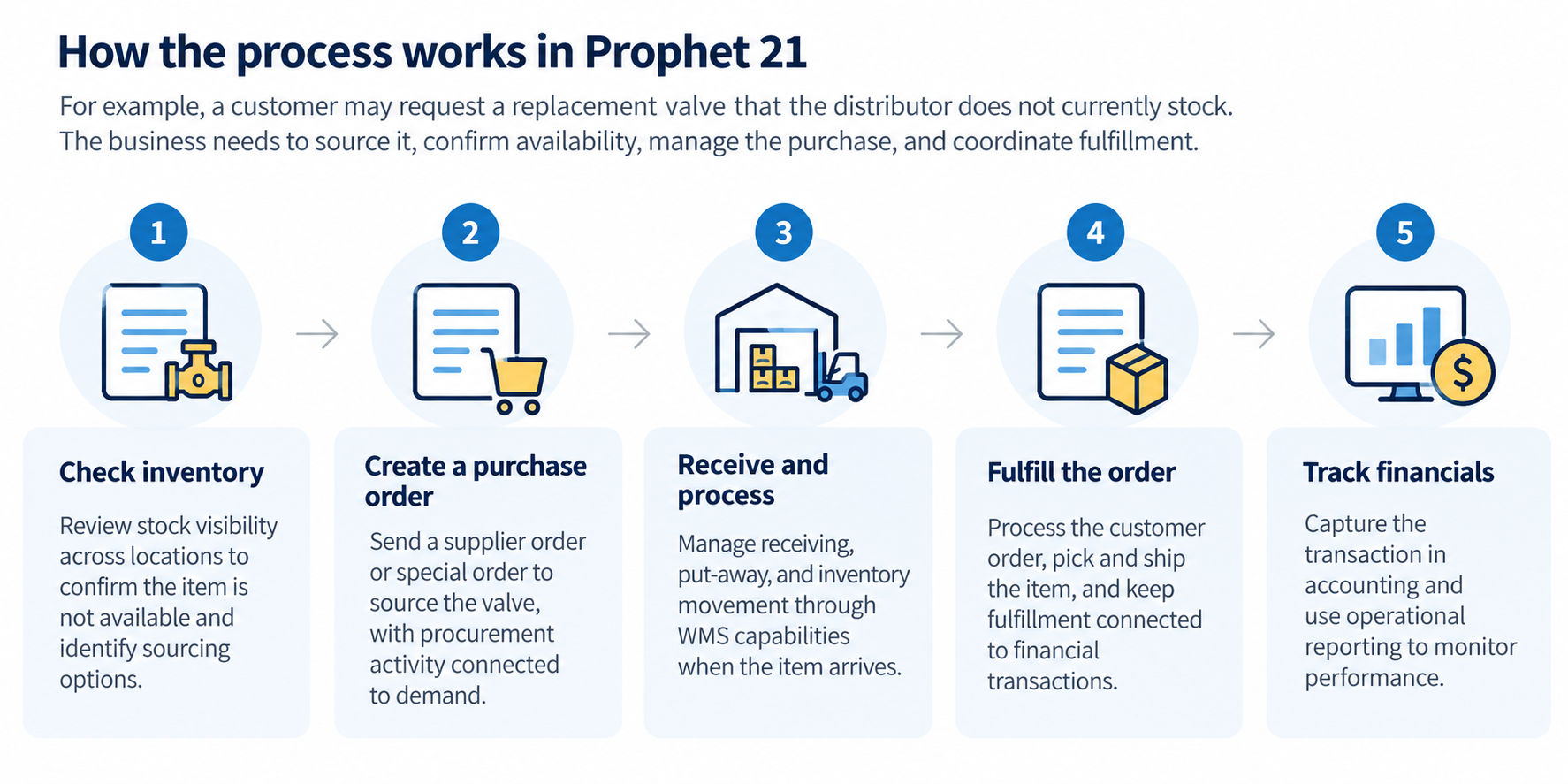
Consider a supply house that sells filters, hydraulic components, and replacement parts to commercial customers. It needs to know what is available, what has already been committed, and what must be purchased.
Prophet 21 provides capabilities for:
- Inventory management: Stock visibility, inventory replenishment, and purchasing decisions across locations.
- Purchasing: Supplier orders, special orders, and procurement activity connected to demand.
- Warehouse management: Receiving, put-away, picking, and inventory movement through its WMS capabilities.
- Order management: Customer orders connected to fulfillment and financial transactions.
- Financial management: Accounting and operational reporting within the ERP.
When Prophet 21 may exceed the required scope
There is a trade-off if you decide to change your inventory or warehouse software for reasons other than improving your inventory/warehouse management. There may be a small equipment dealer that has both their stock managed by QuickBooks and an inventory program. But they still have difficulty with tasks like tracking all their estimates and scheduling service calls.
Although Prophet 21 offers some assistance with managing customers and service activities, implementing an ERP will require migrating your accounting system and training employees on how to use the new system. There will also be additional administrative work required to continue operating. Thus, before committing to the project, it would be wise for the company to assess whether the changes being implemented through the ERP will resolve enough of their current issues to warrant the investment in the first place.
NetSuite connects financial management with broader business operations
NetSuite is a cloud ERP that marries financial management with operations. It covers various verticals, including inventory, order management, procurement, and classic CRM offerings such as lead management and customer visibility.
Where NetSuite supports industrial equipment and distributors
NetSuite offers various capabilities for different types of work.
NetSuite offers capabilities for:
- Financial management: General ledger, accounts payable, accounts receivable, and financial reporting.
- Multi-entity operations: Subsidiary management and consolidated reporting through capabilities such as NetSuite OneWorld.
- Inventory and purchasing: Stock management, replenishment, procurement, and order processing.
- Warehouse operations: Picking, receiving, and other warehouse processes through relevant capabilities and modules.
- CRM: Customer records and sales activity within the wider business suite.
This makes NetSuite especially relevant as a distributor’s operational requirements become more complex.
What should distributors verify before selecting NetSuite?
NetSuite offers several options, but under different subscription terms. If the company also conducts retail sales or processes e-commerce orders, request that the vendor demonstrate how the retail or e-commerce sales process ties into the business’s inventory levels and financials. Confirm whether retail and e-commerce processing will need to be completed through separate integration channels and require additional software modules.
Method connects customer and operational workflows to QuickBooks
Method CRM takes a different approach. Instead of replacing QuickBooks, it connects customer management and operational workflows to the accounting software the business already uses.
Method provides a real-time, two-way QuickBooks sync, allowing supported customer and transaction information to move between the systems. The goal is to reduce the spreadsheets and repeated entry that develop when QuickBooks is the only shared business application.
Keep customer and transaction information connected
Method performed internal research involving 39 industrial and equipment distribution companies. In that group, 72 percent stated that they have had to work around some sort of problem relating to getting their data from QuickBooks to another system. 44 percent of respondents identified problems related to creating a quote or order, and 62 percent said that there was too much resistance from either the software itself or the need for customizations.
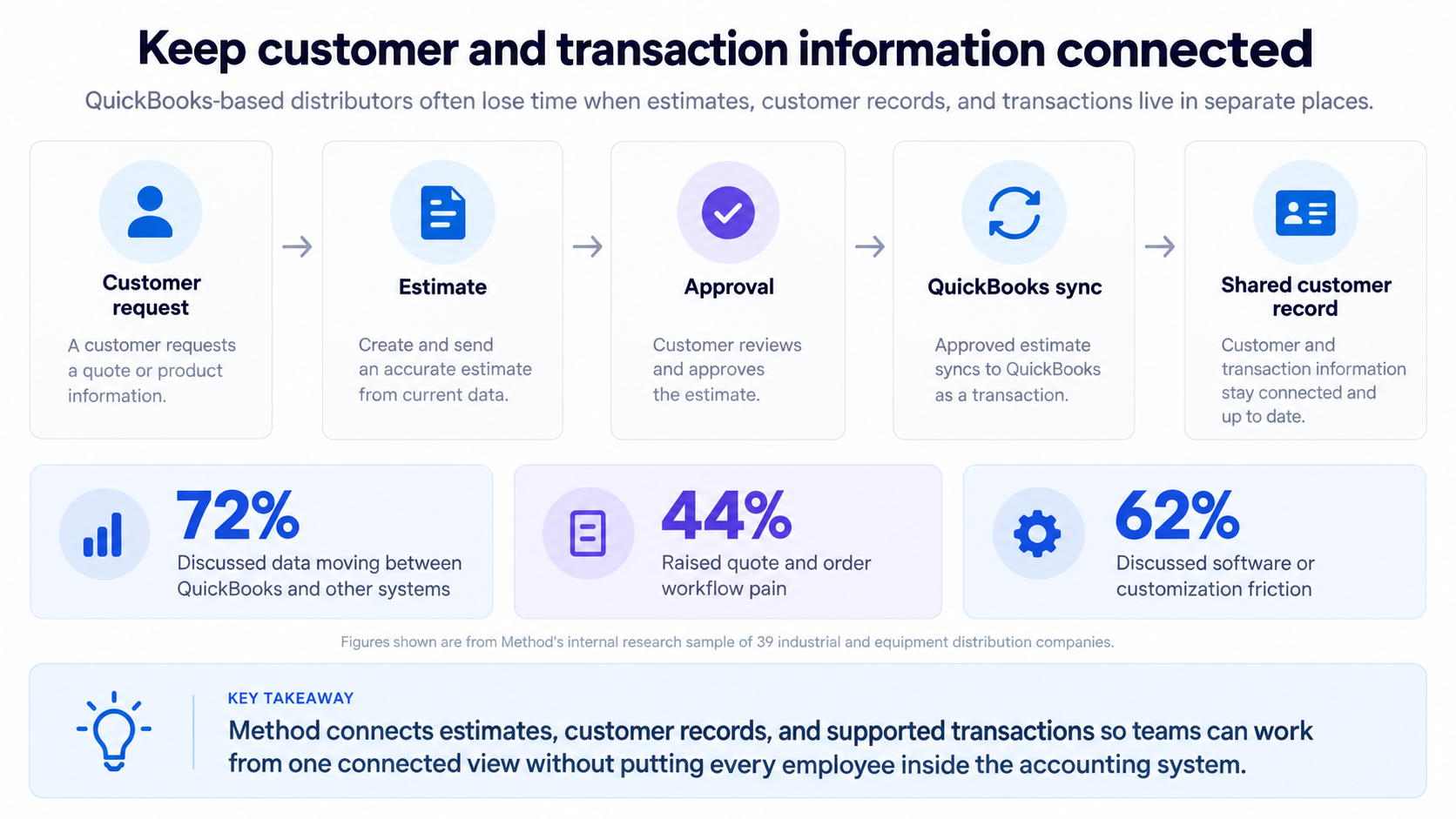
In many cases, the distributor’s main concern will be the process of getting something done. A customer has requested an estimate; one employee completes it on a document outside QuickBooks; and, once approved, another employee enters the same information into QuickBooks.
- Method can connect estimates, customer records, and supported transactions through its QuickBooks integration.
- Sales teams can access relevant information without requiring every employee to work directly in the accounting system.
Build workflows around the way the distributor operates
Distributors typically require different data entry fields based on their needs. For example, if you are an equipment dealer, you will likely want to collect information such as model number, serial number, installation location, and warranty details for each piece of equipment sold. If you operate a supply house, you will likely be required to collect customer-specific part numbers and other information for an estimate.
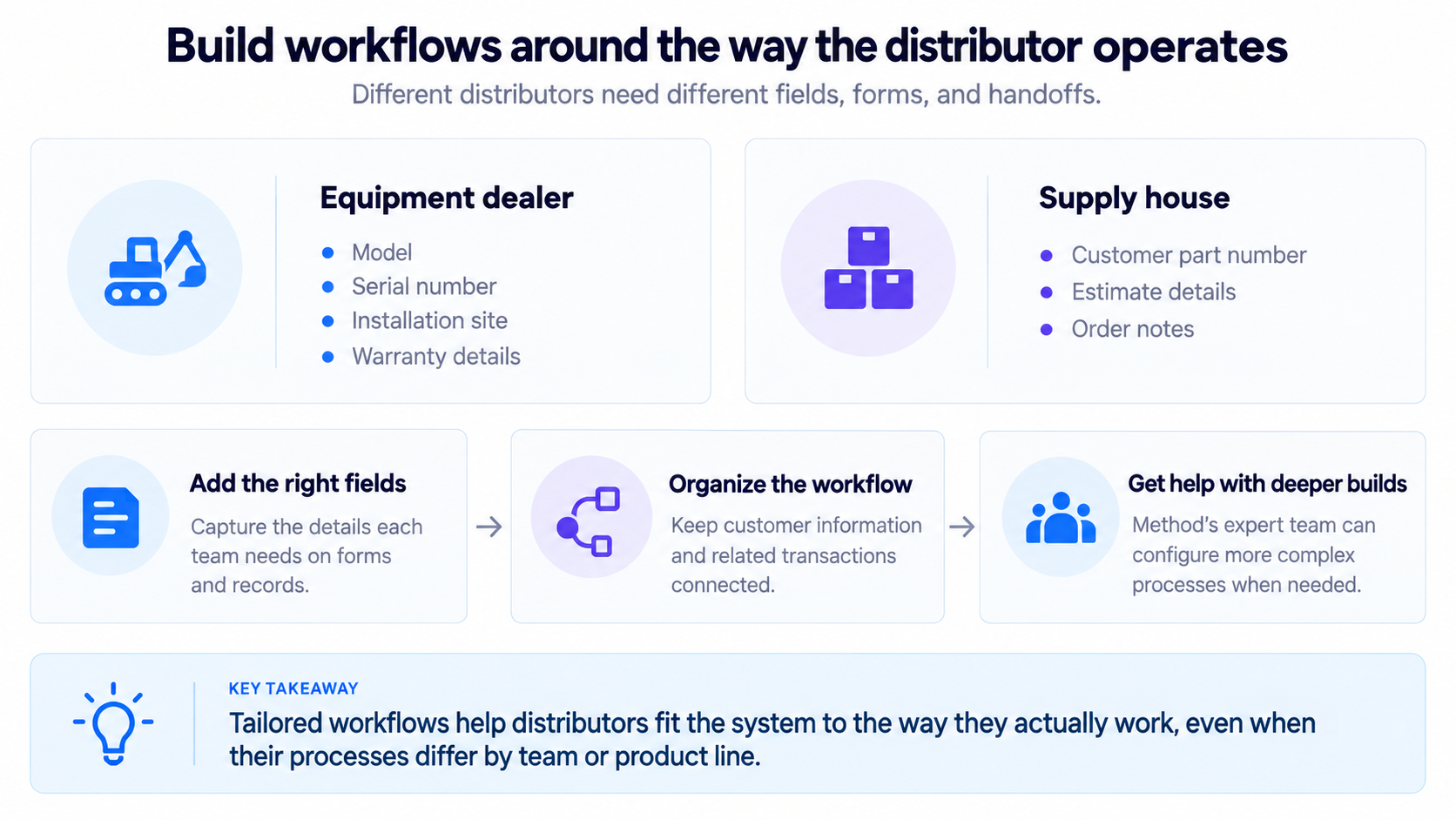
Method’s customization and workflow capabilities can help organize those details around the customer and the related transactions.
For deeper builds, Method’s expert team can configure more complex processes around the business’s requirements. This distinction matters for distributors that need a tailored workflow but do not have an internal software administrator.
Connect equipment records to service activity
For equipment dealers, customer history extends beyond the original sale. The business may need to retrieve the machine’s serial number, review previous repairs, confirm warranty information, or prepare a new service estimate.
Method can be customized to connect equipment records with customer information and service workflows. Its work order capabilities also support the coordination of field activity and the subsequent billing process.
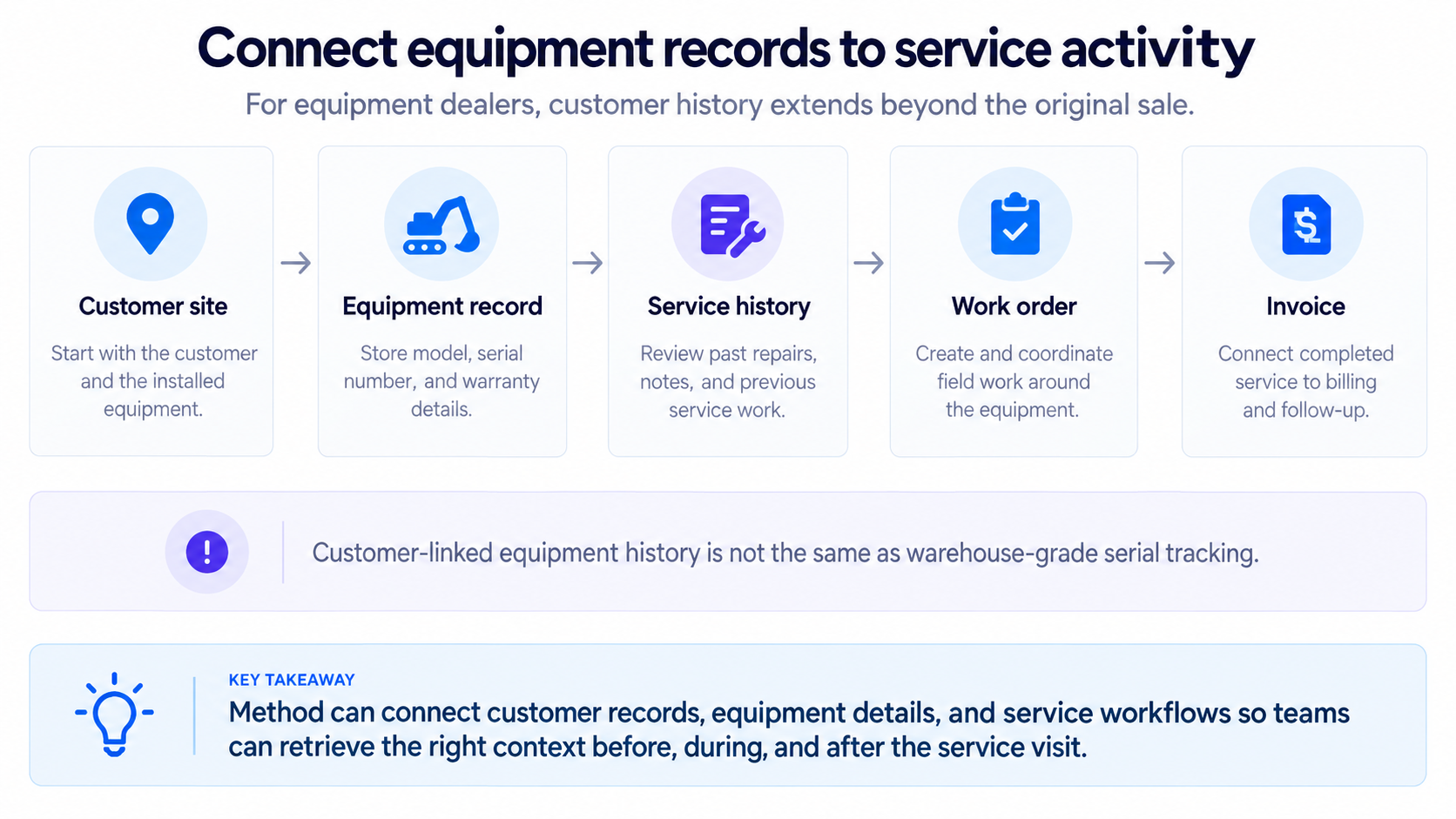
However, customer-linked equipment records are not the same as warehouse-grade serial number tracking. A business that needs serial-level stock control, bin management, or replenishment should evaluate a dedicated inventory system or ERP.
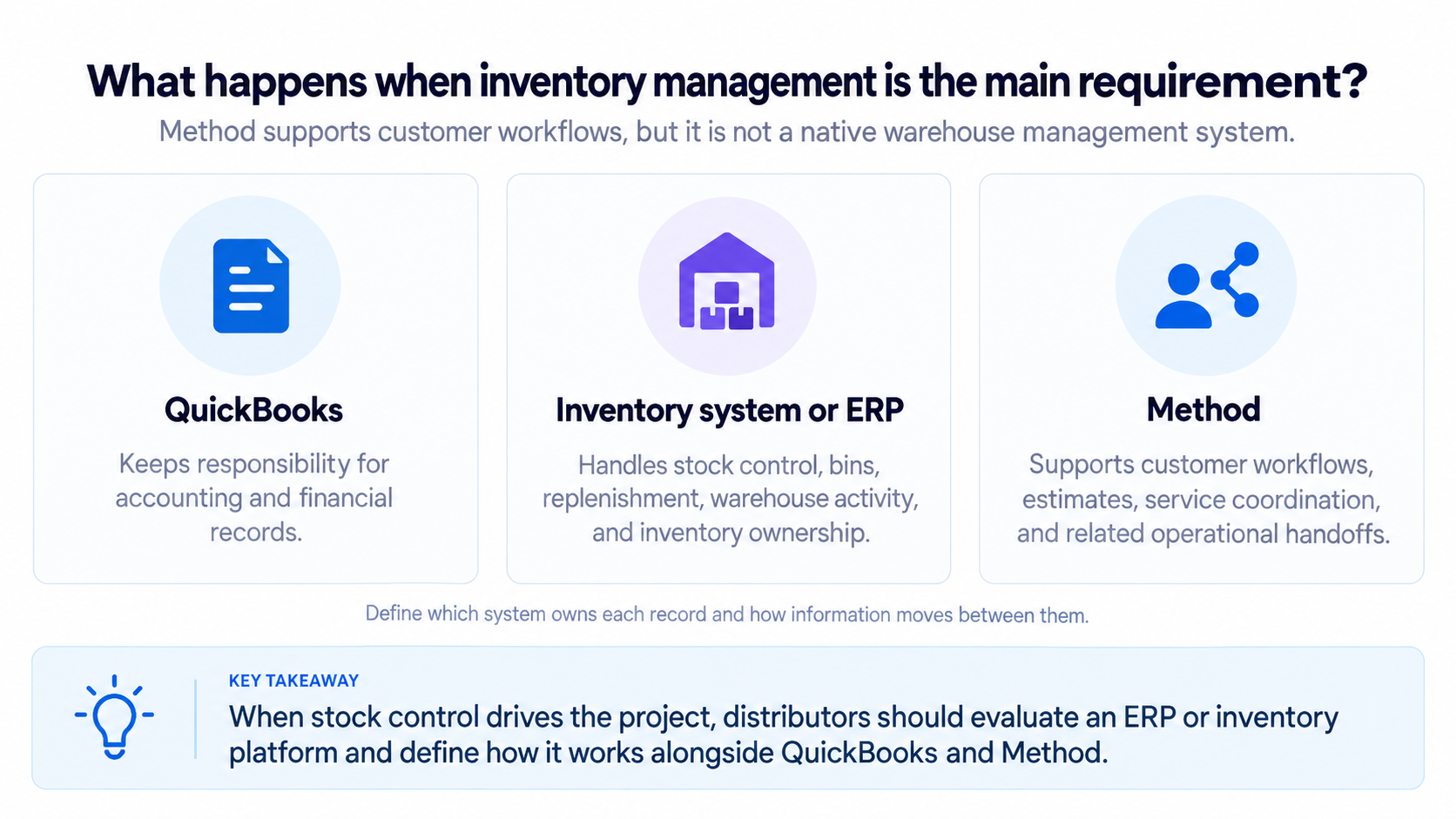
What happens when inventory management is the main requirement?
Method is not a native warehouse management system (WMS), and thus it doesn’t replace some of the features an ERP offers, such as advanced inventory and warehouse execution.
A distributor can look at Method alongside an already existing inventory application, with QuickBooks retaining responsibility for accounting. The important step is defining which system owns each record and how information moves between them.
How the three options handle everyday distribution workflows
The following breaks down how all three options handle different challenges related to distribution workflows.
Managing complex quotes and customer-specific pricing
Industrial distributors often prepare quotes based on changes in supplier costs, negotiated customer prices, and non-stock items. An accepted estimate may also require approval before purchasing begins.
| System | Quoting approach |
|---|---|
| Prophet 21 | Connects distribution pricing, customer orders, purchasing, and fulfillment within its ERP. |
| NetSuite | Connects sales transactions with financial and operational processes; configuration determines the quoting workflow. |
| Method | Connects customer records, estimates, follow-ups, and QuickBooks transactions through customizable CRM workflows. |
This method is particularly relevant when it comes to quoting. This method can help resolve quoting issues by configuring forms around the information the team uses and keeping estimates linked to customer history. For more context, see our guide to why standard CRMs can fall short when quotes become orders.
Moving an approved quote into purchasing and fulfillment
Once the customer approves a quote, the business must determine whether the product is available and what else is need in terms of logistics.
Order created→
Stock checked→
Procurement→
Fulfillment→
Invoice
Prophet 21 and NetSuite will enable inventory, procurement, and fulfillment within a single ERP application.
The methodology is designed to integrate customer-facing processes with QuickBooks, provided you maintain your current QuickBooks transactional activity and, if required, manage inventory in either QuickBooks or another inventory management program.
If companies currently use QuickBooks Desktop, it would likely simplify the transition by allowing them to keep their existing system in place. Still, it needs to be confirmed how much work will be involved before implementing an integrated process.
Keeping customer and equipment history together
Equipment Dealers will need to know what the customer purchased. They will also need to know where each of their machines is located and what has happened to them since delivery. Prophet 21 and NetSuite offer ERP and service-related capabilities that should be evaluated against the dealer’s requirements and available modules.
Method can be configured around customer-linked equipment records, warranty details, and service history.
One real use case can be seen in that of HealthLinc Medical Equipment. The company uses Method to coordinate quotes, work orders, invoicing, and technician scheduling, all integrated into their QuickBooks-based accounting system.
HealthLinc reported a 20–30% reduction in order processing time and 66% faster data retrieval. Those results describe its specific implementation, not guaranteed outcomes for every distributor.
Coordinating parts and field service after the sale
When a customer requests services, the office will require identification of the piece of equipment involved in the issue. The office will also need to determine what type of service request the customer has made. After determining both factors, the office can forward this information to the assigned technician so they have all relevant details prior to their visit.
After completing work on the customer’s equipment, the technician may be required to document the completed work. Additionally, depending on how the organization prefers to do business, the technician may need to receive approval from an authorized staff member before returning and providing the necessary documentation to the billing department to generate an invoice.
Method can connect customer and equipment information to field-service workflows, allowing employees to access relevant information from the field.
For a dealer whose service business depends on repeat customer relationships, keeping that history accessible can be as important as managing the original equipment sale.
Operating across warehouses, branches, and business entities
These requirements often appear together, but they are not the same problem. Assess scalability against your actual plans, whether that means more warehouses or something else.
| Requirement | What the business needs to evaluate |
|---|---|
| Multiple warehouses | Stock by location, bins, picking, replenishment, and transfers. |
| Multiple branches | Customer ownership, territories, staff permissions, and location-specific workflows. |
| Multiple legal entities | Separate accounting records, financial consolidation, currencies, and intercompany transactions. |
Prophet 21 addresses distribution and branch operations, while NetSuite offers broad financial and multi-entity management capabilities, including OneWorld.
Method can support customer-facing branch workflows, but advanced warehouse control and consolidated multi-entity accounting require the appropriate inventory or financial system.
Epicor vs. NetSuite vs. Method pricing and total cost of ownership
The price of software subscriptions for each product cannot provide an accurate basis for determining whether these products have comparable value. Prophet 21 and NetSuite are both ERP platforms. Method is both a CRM platform and workflow management system that still allows its users to retain their current QuickBooks platform. Thus, it’s difficult to compare like-for-like, as each product has different levels of functionality.
NetSuite pricing consists of licensing for a base platform, plus optional modules, and per-user licenses as well as a separate fee for implementing the product. Prophet 21 pricing is based on a custom proposal that outlines the customer’s specific needs and the corresponding solution. Method pricing is based on a subscription, the number of users, and the amount of customization or integration work required.
Rather than making comparisons based on unsupported monthly estimates, use the following framework to determine your total investment.
| Cost area | Questions to ask |
|---|---|
| Software | Which user licenses, modules, and add-ons are included? |
| Implementation | What work is included in the proposal, and what requires additional services? |
| Migration | Which QuickBooks, customer, inventory, and equipment records must move? |
| Customization | How will existing quoting, service, and approval processes be recreated? |
| Training | How much time will employees need to learn the new system? |
| Administration | Who will maintain permissions, integrations, reports, and workflows? |
| Expansion | What happens when the business adds users, warehouses, branches, or entities? |
What makes ERP implementation more expensive?
With ERP solutions, deployment options also affect the investment. Costs may change as a result of adding warehouse modules, migrating legacy data, customizing your process, or on-premises deployment. Changing an accounting system can involve more than just moving customer names and invoice balances from one system to another. The company will likely have to go through several steps, such as reconciling historical data and validating the financial process before putting the new system into use.
Ask which professional services are included in the implementation quote and which cost extra. For a (SaaS) subscription, also confirm what the recurring fee covers, including updates, support, and data storage.
How does keeping QuickBooks change the investment?
A QuickBooks-connected CRM may help narrow the scope of an implementation if your current accounting setup is acceptable. Narrower Implementation Scope means that Method will provide fewer ERP capabilities at a lower cost. Companies that require advanced inventory or warehouse functionality will need to include the cost of these solutions within their comparison.
The correct cost comparison is between solutions that meet the same requirements, not software products that happen to appear in the same search results.
Which option fits your industrial equipment distribution requirements?
The distinction comes down to what the business needs its next system to own.
Distribution operations
Evaluate Prophet 21 when warehouse execution, replenishment, purchasing, and branch inventory are the central requirements.
Broad financial management:
Evaluate NetSuite when the business needs a cloud ERP with financial consolidation and operational management across entities.
QuickBooks-based workflows
Evaluate Method when accounting works but customer records, quoting, order handoffs, and service processes need improvement.
Combined requirements
Evaluate a connected system architecture when advanced inventory and tailored customer workflows require different applications.
Keep QuickBooks. Improve the workaround for it. See how Method connects customer records, quotes, orders, and service workflows through its two-way QuickBooks integration.
Questions to ask during every distribution software demo
Before deciding on industrial distribution software, make sure you do your due diligence. Below is a checklist to help.
Your distribution software demo checklist
- Show the complete process from customer request to quote, order, procurement, fulfillment, and invoice.
- Demonstrate how the system handles a non-stock item that must be purchased after approval.
- Retrieve the serial number, warranty details, and service history of a machine at a customer site.
- Show stock availability by warehouse and identify any additional modules required.
- Demonstrate what an outside rep, technician, office manager, and accounting employee can access.
- Explain which existing systems will be replaced and which will remain connected.
- Identify all implementation responsibilities, exclusions, and migration requirements.
- Provide a proposal based on the actual users, locations, integrations, and workflows required.
- Demonstrate the dashboards and business intelligence tools employees will use to monitor sales, stock levels, and margins.
- Identify any reports that require additional modules or custom work.
Frequently asked questions
Is Epicor better than NetSuite for distributors?
Prophet 21, by Epicor, has been designed around the operational needs of distributors. These include, but are not limited to: inventory management, purchasing, and warehouse functions. NetSuite offers distributors a wide range of operational features typically found in an ERP system, including financial, inventory, and multi-divisional or entity-based functionality. The key difference will depend on what the distributor requires.
Which Epicor product should distributors compare with NetSuite?
Industrial equipment distributors and supply houses should evaluate Prophet 21 against their operational needs. Businesses with manufacturing and production management requirements should assess Epicor Kinetic separately.
Is Method an ERP?
o. Method is a CRM with customizable workflow tools that can be used in conjunction with QuickBooks Online or Desktop. The features it offers include customer management, quoting, etc. But the CRM has limited ability to provide warehouse management or other advanced inventory applications, as an ERP would.
Can an industrial equipment distributor keep QuickBooks instead of moving to an ERP?
Yes. If QuickBooks meets all their accounting needs, they could then consider purchasing a CRM tool to work with their current inventory program as needed. But if they require additional support for more complex financial or warehouse operations, they should consider replacing both QuickBooks and their current inventory application with an ERP system.
Does NetSuite replace QuickBooks?
NetSuite includes its own accounting and financial management capabilities and can replace QuickBooks as the company’s financial system. Businesses considering the switch should evaluate migration requirements and implementation costs.
Start with the workflow your business needs to improve
Your choice between the three will start with what you need to improve the most. This guide has covered each of these products’ strengths in depth, so it’s up to the distributor to see if Epicor, Method, or NetSuite is right for them.
Leave a Reply