Method AI and HubSpot Breeze both implement AI, but for different purposes and objectives. Method AI helps businesses operate and customize their CRMs through natural language and conversations. HubSpot Breeze is more of an agentic AI platform that helps with various marketing and sales tasks. Method’s two-way sync with QuickBooks also sets it apart.
This comparison article looks at both options to see what works best for the needs of different businesses.
Key takeaways: Method AI vs. HubSpot Breeze
- Method AI helps employees personalize their CRM Forms through conversations. Expert assistance is available for those who want to create more complex customizations.
- HubSpot Breeze uses AI agents across marketing, sales, customer service, and all your customer interactions.
- Breeze uses credits for certain AI actions, while Method AI has no separate per-action customization meter under its initial packaging.
- Method allows for linking both customer and transaction data via its two-way QuickBooks integration.
- HubSpot offers a broader application ecosystem, while Method focuses on customizable CRM and operational workflows around QuickBooks.
Part 1 — HubSpot Breeze’s credit-metered agent model
Two products, two different jobs
HubSpot Breeze and Method AI provide support for different types of manual work. Breeze is a tool that utilizes artificial intelligence to execute tasks in your CRM. This includes things like generating content, recommending outreach actions, and answering customer inquiries. Method AI modifies portions of the CRM so that an employee can do things like creating fields or making form submissions easier than doing it manually
HubSpot Breeze
Uses AI to perform customer-facing tasks across marketing, sales, and service. Its agents work with information and processes inside HubSpot.
Method AI
Uses conversation to customize supported CRM forms, fields, columns, and layouts. More complex processes can be built through Method’s existing customization capabilities and expert team.
How Breeze builds and what it builds on
Breeze offers AI assistance and customized agents throughout HubSpot’s customer platform. The specific version of Breeze a business utilizes will determine what marketing-related content they can create, how best to use their CRM data to inform recommended sales outreach, which customer questions Breeze can help answer, and more.
HubSpot offers Agent Builder, which lets organizations customize customer-based configurations and processes, giving them more opportunities to create AI-powered workflows that support tasks across multiple departments, such as marketing, sales, and service.
Method AI currently does not offer any products that provide equivalent capabilities for prospecting or customer service agents.
Pricing
HubSpot allows for certain AI use as part of their subscription service, but it’s not all-encompassing. Some actions taken by agents may result in additional charges via HubSpot credits. The amount of AI included in the plan will vary depending on your subscription type. If you anticipate your business will require additional AI activity beyond what is initially allowed, your monthly subscription cost could increase. Thus, businesses need to determine both their total subscription costs and how much they expect to use AI at the same time.
| Sales Hub plan | Price per seat/month | Monthly credits | Required onboarding |
|---|---|---|---|
| Starter | $20 | 500 | Not listed |
| Professional | $100 | 3,000 | $1,500 |
| Enterprise | $150 | 5,000 | $3,500 |
These prices are based on the pricing assumptions in the September 2026 comparison brief for HubSpot. HubSpot currently provides the most up-to-date terms in their Product & Services Catalog. Thus, the total price will depend on which products you select and which AI actions you want to perform. Additional subscriptions can also be considered.
Method also uses a subscription-based model. The CRM Quick Start, Pro, and Enterprise plans for Method all include Method AI as part of the initial launch package and offer a 10-day free trial. While Breeze allows users to take metered agent actions, supported Method AI customizations do not consume credits from a separate credit pool.
Credit composition and where the allowance goes
HubSpot assigns a credit rate to each type of action an artificial intelligence (AI) performs. In the brief comparison above, a content agent-generated article is given a credit rating of 1,000, a prospecting agent recommendation receives a credit rating of 100, while a customer service agent’s response to an issue resolution earns 50 credits. These ratings enable organizations to determine how much of their allotted monthly credits will be used for routine work.
What 3,000 monthly credits can cover
- 3 pieces of content at 1,000 credits each.
- 30 prospecting recommendations at 100 credits each.
- 60 resolved customer conversations at 50 credits each.
These are separate examples using the same 3,000-credit allowance, not three allowances that can be used together.
The included-allowance problem
Unused HubSpot Credits expire at the end of the monthly time frame; therefore, companies can’t carry over excess capacity into an anticipated busier month. In addition, although HubSpot provides administrators with tools such as usage tracking and spending limits, they are required to monitor how much credit their company has used and determine whether they need additional capacity.
In addition, extra credits will be billed at $0.010 per credit at the standard rate. Therefore, this creates a variable expense for AI usage that needs to be considered in the business’s annual budget planning process, especially when agents run continuously or when demand fluctuates on an ongoing basis.
Method AI uses a different model. Supported conversational customizations do not consume a separate credit allowance under Method’s initial packaging. More complex builds may require expert services, so the subscription should not be treated as covering every customization request.
What outcome-based pricing does and doesn’t fix
Outcome-based pricing models are based upon a client’s performance in completing an activity or activity-related actions. Customer Agent (CA) pricing is structured around CA charges per resolved conversation (as opposed to per conversation interaction). Similarly, Prospect Agent (PA) pricing is typically tied to the number of qualified leads that PA passes to sales.
In this way, clients can better associate their spending with the amount of work being done by their client-supporting agents. But outcome-based pricing models do not limit the total amount spent. For example, if a service team using AI resolves all conversations within its service offering, the number of credits consumed will be higher due to the increased volume of activity.
QuickBooks integration limitations
HubSpot has a QuickBooks Online integration that pulls customers, products, invoices, and credit memos into HubSpot and supports two-way invoice synchronization in eligible setups. But it must be noted that there are a few restrictions or limitations within the QuickBooks Online application related to two-way invoicing, such as editing HubSpot-created invoices in QuickBooks Online and synchronizing payments applied to multiple invoices. Businesses that require custom mapping of the invoice field in QuickBooks need to check with their data hub administrator to determine whether this is possible and to verify how taxes are handled in their QuickBooks location.
Method uses a two-way sync, linking supported fields from QuickBooks to Method Forms while maintaining QuickBooks as the accounting system of record. This is important because employees may want their CRM to reflect all the details captured in an accounting transaction.
Example: A QuickBooks invoice has a ship-date field that the Method form does not display. An employee can ask Method AI to add the supported field, enter the date, and save the value through Method’s existing QuickBooks synchronization process.
Building the customization does not send QuickBooks data to an AI model. The existing integration continues to handle supported transaction information.
Summary of the Breeze model
Breeze provides a broad set of AI capabilities for businesses that want agents working across marketing, sales, and customer service. Its credit model makes usage measurable, while HubSpot’s wider platform provides the customer information and workflows those agents need.
For businesses evaluating Breeze, the key questions concern expected AI usage, additional subscriptions, and how the QuickBooks integration handles their required transactions. Method AI addresses a different requirement by making supported CRM customization accessible through conversation while keeping operational workflows connected to accounting.
Part 2 Method AI vs. HubSpot Breeze for CRM customization, customer engagement, and accounting-connected workflows
HubSpot overview
HubSpot combines CRM, marketing, sales, and service capabilities within a broader customer platform. Breeze adds AI assistance and agents to existing tools, making it relevant for organizations that want to automate customer-facing work across multiple departments.
Method AI overview
Method AI focuses on adapting the CRM to the business. Employees can describe supported changes to forms, fields, columns, and layouts, while Method’s existing customization capabilities and expert team handle more complex requirements. These supported conversational changes do not consume a separate AI credit allowance under the initial launch packaging.
Use case 1: Adapt the CRM to a non-standard sales and fulfillment process
For example, let’s say a company wants to include warranty information and lead times in their quote. They want sales reps to see these types of things when creating a quote, but their current CRM setup doesn’t allow it. Here is how they would implement either system to solve this problem.
With HubSpot
Custom properties, configurable layouts, and workflows support tailored sales processes. More complex object relationships may require Enterprise capabilities and additional configuration.
With Method AI
An employee describes the field or layout change in plain language, and Method AI makes the supported customization directly on the form.
HubSpot offers extensive configuration and downstream workflow capabilities, particularly for businesses with an established CRM administrator. Method AI reduces the effort required to make supported form changes. Neither product should be credited with automatically creating approval logic simply because it can add a field.
Use case 2: Turn an accepted quote into an order, and an order into a job
Once a customer approves a configured machine, the manufacturer needs to create an order and provide production with the information required to build it. One of the business’s objectives is to keep all customers’ specifications and product details linked throughout the process to avoid duplicate data entry.
Deals, quotes, line items, invoices, and workflows in HubSpot help businesses manage customer requirements, quantities, and product details. However, if a business requires custom manufacturing orders, there may be other configurations or third-party applications that will need to be integrated into their process.
Method’s ability to track sales and work orders is part of its overall CRM system. Method’s records can be used to document the steps between when a customer accepts an estimate and when they send payment for the sale; however, how those transitions occur is determined by configuration.
Important distinction: Method CRM can support these workflows, but Method AI does not currently build the automation connecting them from a description. Complex handoffs require Method’s existing customization tools or expert services.
Use case 3: Keep estimates, invoices, customers, and payments aligned with accounting
A distributor may want its CRM to show the same information as employees do when using an invoice in QuickBooks. The company needs to know which fields are being synced and where, who is allowed to sync those fields, and whether they will update the correct financial accounting record.
QuickBooks Online offers a connector to sync with HubSpot, and the configuration lets you map your custom invoice field(s) to the appropriate field in QuickBooks. It is still up to each buyer to run their specific transactions through HubSpot’s documentation on which edits are restricted, which payments are limited, and how data is synchronized.
Method’s two-way QuickBooks integration supports a more closely connected accounting workflow for eligible fields. Method AI can help surface an existing supported QuickBooks field on a Method form, while the integration manages the corresponding saved values. The practical difference depends on how much accounting detail employees need inside their CRM.
Use case 4: Build more advanced automations or connect other applications
Companies have various needs such as approval flows, multiple approval steps, etc. They also want to integrate their HubSpot CRM with their marketing apps, support apps, etc. As such, companies require functionality that goes beyond customizing how forms look and/or which data they capture.
HubSpot offers an extensive App Marketplace, including APIs, workflows, agents, and agent builders. Most organizations will have at least one internal administrator who can create complex workflows using all of the above tools and connect to a large number of third-party applications.
Method provides an API and expert customization services for more complex requirements. Method AI does not yet generate working buttons, calculations, or multi-step automations through conversation. Businesses can use the existing platform’s customization capabilities or work with Method’s experts, with an initial complimentary hour available for deeper builds.
Feature comparison
The comparison below breaks down the features of Method AI vs. HubSpot Breeze.
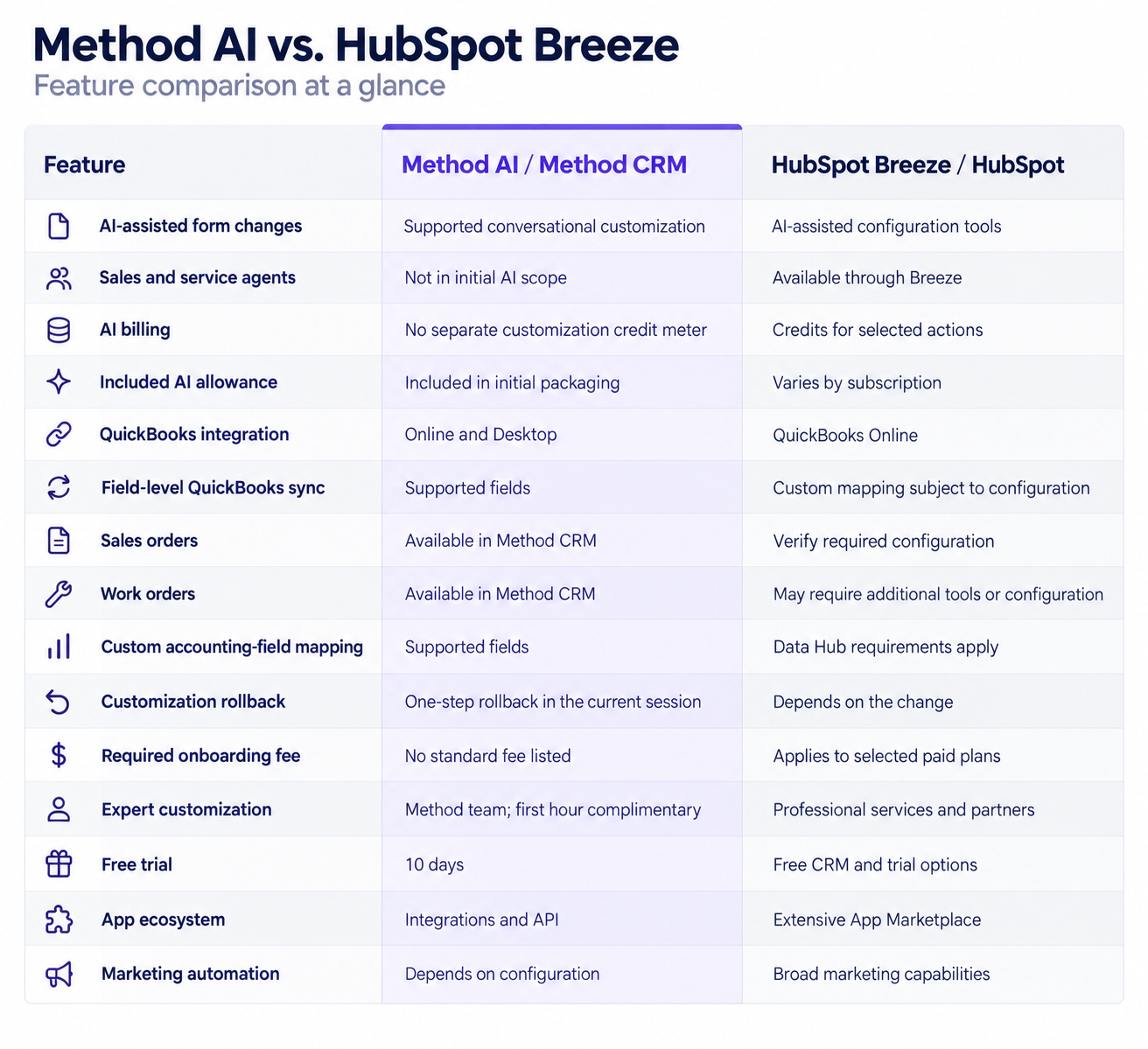
Key Method features not available in HubSpot Breeze
One of the main differences in Method AI’s design is that it enables employees to customize the layout of all the various CRM forms and fields they use within a platform that surrounds QuickBooks. They can tell Method what has changed, like the layout, label, or column, rather than doing this individually and then updating each field. In addition, Method currently offers bidirectional support for those accounting fields used in customer-facing applications.
Method provides many other functions, such as sales orders, work orders, and expert customization services. With Method, your purchase includes 1 hour of free consulting time if you need help beyond standard configurations. The capabilities listed above are part of Method CRM and depend on how you configure Method.
Cost comparison
The cost to use these platforms is far from a simple, one-time fee. For example, HubSpot may have costs beyond the platform price, such as additional AI credits, onboarding, and other subscriptions required to support advanced integration. Method users may incur additional costs depending on their CRM subscription and whether they have expert-level customization or integrations.
For example, we’ve examined the following case to compare 10 licensed users on an annual payment plan, using the same pricing assumptions as in the authors’ September 2026 comparison brief. This example does not include any subscription fees paid to QuickBooks or any amounts paid for HubSpot credit overages; it also does not include any optional products or additional costs for custom implementation work.
| Cost | HubSpot Sales Hub Professional | Method CRM Pro |
|---|---|---|
| Monthly subscription | $1,000 | $450 |
| Required onboarding | $1,500 | No standard fee listed |
| AI usage | 3,000 included credits/month | Method AI included at launch |
| Illustrative first year | $13,500 | $5,400 |
HubSpot Breeze vs. Method AI: which should you choose?
HubSpot Breeze offers many AI features for companies that are investing in marketing, sales productivity, and customer service. The agents and integrations available for Breeze enable businesses to automatically process multiple applications they use with their customers.
Method AI has a completely different focus than does HubSpot Breeze. It emphasizes making customization of the supported CRM system easier through conversations, while Method’s current platform can connect operational workflows to QuickBooks. This method is beneficial for businesses that currently use QuickBooks, as it allows employees to be more productive without requiring them to replace their accounting systems.
Method AI fits businesses that:
- Want to keep QuickBooks.
- Need CRM forms adapted to existing processes.
- Manage quotes, orders, and service workflows.
- Want access to expert customization.
HubSpot Breeze fits businesses that:
- Need AI agents for customer-facing work.
- Prioritize marketing and sales automation.
- Use a broad collection of SaaS applications.
- Have resources for CRM administration.
Both products offer opportunities to test their capabilities before committing. Method provides a 10-day free trial without a credit card, while HubSpot offers a free CRM and trial options for paid products. Use a representative workflow during each evaluation and confirm the features included in the proposed subscription.
FAQ
Do HubSpot Credits roll over if I don’t use them?
No. Your included HubSpot Credits reset every month, and you won’t be able to save any unused credit. When evaluating this type of service, you should consider what your “normal” and “peak” usage will look like for all
What actually draws down a credit — which actions are metered and which aren’t?
HubSpot has selected content agent, prospecting agent, customer agent, data agent, and AI workflow actions to pull from your credits. Each one uses a different number of credits, and depending on the Breeze features you’re using, some will have usage fees attached while others won’t.
Can I use HubSpot and Method together?
Businesses can evaluate a combined setup when the platforms serve different purposes. But they should verify the required integration and establish which application owns customer, transaction, and accounting information before implementation.
Leave a Reply