Choosing between Method AI and Zoho Zia will depend on how you want AI to enhance your business. If you are looking for a low-cost CRM license coupled with a wide range of AI applications within that platform, then Zoho may be best for you. But if you prefer to connect conversational customization with operational workflows in QuickBooks, Method AI may be the better fit.
This comparison compares the two tools, provides examples of QuickBooks integration, describes three possible workflow applications for each product, and lists additional costs beyond the subscription.
Key takeaways
- Zoho CRM has lower publicly stated license prices and integrates well with companies already using Zoho’s applications.
- Zia provides predictive and generative help, as well as agent- and prompt-based customizations, which can vary depending on which version of Zoho you have.
- Method AI enables an employee to modify the format of the CRM form that Method supports. Method also synchronizes all operational data from QuickBooks to your CRM.
- Zoho CRM only supports one-way syncing of things like quotes and invoices from QuickBooks to Zoho
Method AI vs. Zoho Zia at a glance
Below is a snapshot of Method AI and Zoho Zia.
| What to compare | Method AI / Method CRM | Zoho Zia / Zoho CRM |
|---|---|---|
| What the AI does | Changing CRM forms, fields, and layouts. | CRM Customization, predictions, content, and AI agents. |
| Customer profile | Teams using QuickBooks with their own customized sales and fulfillment process. | Businesses that need low-cost CRM options or use a collection of related Zoho applications. |
| Pricing model | Per-user CRM subscription; AI included in initial packaging. | Per-user CRM plans; AI capabilities and limits vary by edition. |
| Published entry price | Quick Start: $35/user/month. | Standard: $14/user/month, billed annually. |
| Administration | Employees request supported changes; experts handle deeper builds. | Appropriate permissions and edition are required for setup changes. |
| QuickBooks connection | Two-way sync with supported Online and Desktop records. | Native QuickBooks integration with different sync directions by record type. |
| Prompt-based building | Supported fields, columns, labels, and layouts. | Modules and workflows through supported Zia setup features. |
| Current limits | AI cannot independently build complex automations or agents. | Features vary by tier, rollout, permissions, and supported language. |
| Operational records | Sales orders and work orders in Method CRM. | Sales orders in CRM; work orders through Zoho FSM or a custom setup. |
| Relevant fit | Adapting workflows around an existing QuickBooks file. | Using AI across CRM and a wider set of Zoho applications. |
Part 1: What Zoho Zia is built to do
Zia provides more extensive conversational customization than Method AI. While Method builds on its conversational customization, it does so within a larger CRM designed for use in QuickBooks-based operations. This comparison begins by comparing what Zia can do in terms of conversational customization before focusing on where business data goes after changes are implemented.
How Zia works
Zia is Zoho’s artificial intelligence assistant that has access to all of Zoho’s CRM data and various business applications. In Zoho CRM, Zia assists with all sorts of tasks, from generating content to providing predictive insights for sales and customer interactions. It’s also developing AI-based automation using agents.
Zoho also documents natural-language creation of modules and workflows, so its customization capabilities go far beyond that of a writing assistant.
For example, an authorized user can describe a new module and let Zia propose fields and a layout. Afterward, the user will review the proposed layout and adjust the necessary permissions or properties for each field as appropriate. As previously mentioned, users’ access to specific creation tools depends on the product edition and release.
Zoho Zia pricing and which plan it sits in
Zoho’s annual subscription is $14/month per user for Standard, $23/month for Professional, $40/month for Enterprise, and $52/month for Ultimate. The Professional version provides users with access to select AI tools, whereas the Enterprise version expands on those by providing additional predictive and agent-based tools. Each individual tool may be restricted from use due to an edition requirement or to roll out the functionality across all users in your organization.
| Zoho CRM plan | 10 users/month | 25 users/month | 50 users/month |
|---|---|---|---|
| Professional at $23/user | $230 | $575 | $1,150 |
| Enterprise at $40/user | $400 | $1,000 | $2,000 |
| Ultimate at $52/user | $520 | $1,300 | $2,600 |
What Zoho Zia is genuinely better at
Zoho offers a wide array of AI-based capabilities across its suite of applications at a relatively low cost compared to most other CRM applications. In addition to using Zia to make sales forecasts, send emails that assist with tasks, create summaries of records, and interact with customers via chatbots, Zoho also allows customers to customize Zia to suit their business operations. Furthermore, because multiple applications in the Zoho suite integrate seamlessly, there is less likelihood that a business will need to use a third-party application developer.
Where the accounting connection changes the math
Zoho supports two-way synchronization for selected contact, account, vendor, and product records. Its documented quote, invoice, and purchase-order synchronization runs from QuickBooks into Zoho CRM, with those imported records read-only in the CRM.
An example of this would be if a client changes their PO number that was originally entered in conjunction with an approved quote. Due to circumstances beyond the company’s control, the business needs to enter the new PO number on their QuickBooks invoice. Adding a field in Zoho itself does not inherently enable write-back to the original QuickBooks invoice. The business will have to determine whether to use QuickBooks’ native connector or develop a custom workflow to complete the desired transaction.
The integration question: Identify the records you will be syncing, how they will flow, and how your system will behave when someone modifies a submitted or approved transaction.
Where a Zoho build gets expensive for a smaller team
The actual cost of the software itself can be less with Zoho due to their low licensing fees. Zoho’s lower license price is real, but the subscription is only one part of the budget. A business may also need a connector that supports its exact QuickBooks transactions, configuration of quoting and fulfillment records, data migration, training, and ongoing administration.
Zoho CRM already includes sales orders, so a business should not budget to recreate them without first testing the native record. Work orders are a different question: Zoho supports them through Zoho FSM, which may add another application and integration to maintain. A custom manufacturing job record may need a different setup.
Summary of Zoho Zia for a QuickBooks-based business
A QuickBooks-based team should test its required transaction flow before comparing license totals. The accounting connection may be a minor requirement or a central part of the CRM decision.
What to verify before choosing Zoho
- Its published CRM license prices are lower than Method’s.
- Zia supports more AI activities than Method AI’s initial scope.
- Prompt-based building depends on the relevant edition and rollout.
- Zoho CRM includes native sales orders.
- Zoho FSM can provide work orders through a connected application.
- The native QuickBooks integration does not provide the same sync direction for every record.
Part 2: Method AI vs. Zia for everyday customization
The prompt experience is similar enough that neither product should be described as the only conversational CRM builder. The following scenarios compare the records each product uses and what happens after an employee makes a change.
Zoho Zia overview
Zia supports prompts for selected CRM configuration tasks and offers broader AI assistance. Users need the appropriate edition, permissions, and feature access. The resulting records work within Zoho’s data model and configured integrations.
Method AI overview
Method AI changes supported fields and layouts through conversation. Where a form exposes a supported QuickBooks field, values can continue through Method’s established two-way sync rather than remaining only in the CRM.
Use case 1 — The quote: build lead time
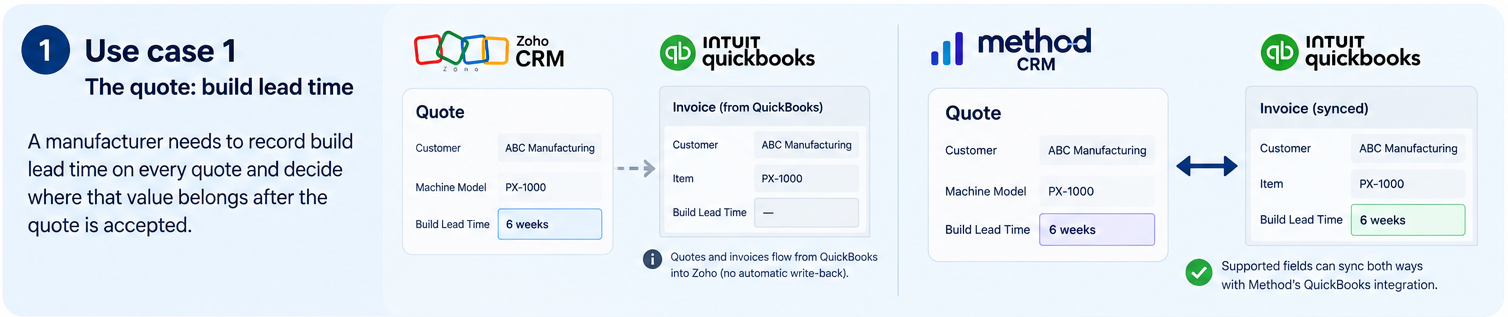
A manufacturer quotes a configured machine and needs to record its build lead time consistently.
Zoho can customize the CRM field as a custom field on quote-related records; it also has access to Zia features that support creating the structure for the supported CRM. The team will need to check whether the lead time value is synchronized with QuickBooks. And in which direction. The native QuickBooks transaction flow does not natively sync from CRM back into QuickBooks.
Method AI can help expose a supported lead-time field on the relevant form. If that field maps to an existing supported QuickBooks transaction field, Method’s integration can carry the saved value into the accounting record. A newly created CRM-only field should not be assumed to sync unless the mapping exists.
Use case 2 — The order: the customer’s own part number

A distributor and an end user will have different identifier numbers for their products. Employees and customers need to know they are referring to the same product.
The Zoho CRM system provides native sales order functionality and custom fields. The team can customize the appropriate product information in Zoho and utilize its own terminology. Whether the customer’s part number carries over to other applications depends on which field mappings were chosen during the Zoho integration.
Method also supports sales orders. If an employee asks Method AI to rename a supported column or adjust a form to reflect familiar labels for the shop, then the next useful test is whether both identifiers remain correct as the order moves through fulfillment and ultimately into any connected QuickBooks transaction.
Use case 3 — The job: a record the accounting system doesn’t have
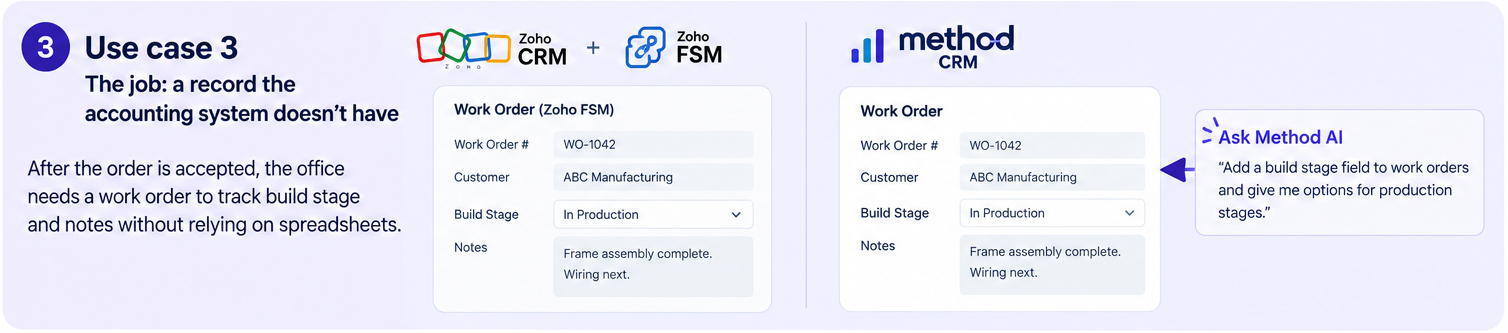
After an order has been placed and the company’s office has confirmed that they want to create a work order record, employees can look up a customer’s status in their respective company’s CRM system. This is much easier than having to stop what they are doing on the factory floor and check several different spreadsheets.
Zoho CRM allows a user to access work orders and service records from Zoho FSM. A business may also need to research and implement a custom CRM module that supports its specific manufacturing operations. The right option depends on whether the business needs a field service application, a production tracking system, or both.
The operational CRM portion of Method contains work order records. Method AI allows users to customize certain fields that support those records as well as their layout. However, any complex stage-change processes or automation would likely require either deeper customization using Method’s full range of customization tools or assistance from Method’s technical team. Neither CRM product should receive credit simply for adding a status field to create a complete production workflow.
What each one actually costs over two years
Zoho’s published license prices are lower. The following comparison uses annual billing rates for Zoho CRM Professional and Enterprise, and Method CRM Pro’s standard $59 monthly rate. It assumes the same number of full users throughout 24 months and excludes taxes and promotional discounts.
| Two-year license cost | 10 users | 25 users | 50 users |
|---|---|---|---|
| Zoho Professional | $5,520 | $13,800 | $27,600 |
| Zoho Enterprise | $9,600 | $24,000 | $48,000 |
| Method CRM Pro | $14,160 | $35,400 | $70,800 |
These figures are useful for a license-cost chart, but they are not implementation quotes. They also do not establish that every Zia feature is available to each team size. The 10-, 25-, and 50-user scenarios must be checked against the eligibility rules for the specific AI capability.
| Additional cost | Method | Zoho |
|---|---|---|
| QuickBooks connection | Built-in sync; special mappings may require work | Native integration available; other sync requirements may need an extension |
| Work orders | Method CRM capability; configuration varies | Zoho FSM or a custom process may be needed |
| Implementation and migration | Scope-dependent | Scope-dependent |
| Training and ongoing admin | Depends on customization and team roles | Depends on apps, permissions, and workflows |
| Changes after launch | Supported AI changes or expert services | Supported Zia changes or configuration services |
The price difference pays for something only when it removes work the business would otherwise need to fund. For a team with simple CRM requirements, Zoho’s lower license cost may remain decisive. For a distributor needing detailed QuickBooks write-back and connected work orders, the implementation comparison matters more than the subscription alone.
Method AI vs. Zoho Zia: feature comparison
| Capability | Method AI / Method CRM | Zoho Zia / Zoho CRM |
|---|---|---|
| Prompt-based customization | Supported forms, fields, and layouts | Supported modules and workflows |
| Sales predictions | Not in initial AI scope | Available in eligible editions |
| Generative writing | Not in initial AI scope | Available through Zia features |
| AI agents | Not in initial AI scope | Available in eligible editions |
| QuickBooks Online | Two-way sync for supported records | Native sync; direction depends on record type |
| QuickBooks Desktop | Supported | Requires a separately verified connection |
| Sales orders | Available in Method CRM | Native Zoho CRM records |
| Work orders | Available in Method CRM | Zoho FSM or custom setup |
| Advanced automation | Platform customization and experts | CRM workflows and eligible Zia tools |
| Wider application suite | Integrations and API | Connected Zoho applications |
| Expert customization | Method team | Zoho services and partners |
Capabilities available in Zia and not in Method AI
Zia offers sales predictions, generative writing, AI agents, and supported prompt-based workflow creation. Those capabilities matter to businesses seeking AI assistance beyond CRM form customization.
Capabilities available in Method and not in Zia
Method’s broader CRM provides its built-in QuickBooks Online and Desktop sync alongside work order records. Zia can customize Zoho, but the AI assistant itself does not replace the integration work required for a different accounting flow.
Which one should you choose?
Use the accounting workflow and the work your team needs AI to perform as your decision criteria. Compare the actual configuration required, not just the number of features in each product.
Follow your workflow
- Need lower-cost CRM and wider Zoho AI? Evaluate Zoho’s relevant edition and confirm the required Zia features.
- Do you need work orders and such to be connected to QuickBooks? Test the corresponding workflows in Method.
- Accounting sync decides the purchase? Demonstrate the same transaction and field change in both configurations.
- Still working from spreadsheets? Map where data is copied before deciding which CRM or integration to buy.
Method’s 10-day trial offers a way to test supported customization and QuickBooks-connected processes. Zoho offers trial options for its CRM plans. Try it out with real quotes and orders so you can make an educated decision for yourself.
Test your QuickBooks workflow
See how Method connects supported customer and transaction information while adapting your CRM to the way your team works.
Frequently asked questions
Does Zoho CRM connect to QuickBooks, and what does that connection cover?
Yes. Zoho indicates it connects via a native QuickBooks integration, which enables two-way synchronization of specific contact, account, vendor, and product information. Quotes, invoices, and purchase orders go from QuickBooks into Zoho CRM. There are third-party connectors available, but confirm what they can provide before deciding to use them.
What’s involved in migrating between Zoho CRM and Method?
First, find out who your customers are, what products you sell, and who is responsible for your transactions in each application. Review how you want to map fields from one application to another (if at all). Check whether you will be exporting any duplicate information. Determine what custom workflows will require rebuilding. Due to these factors, migration will typically take a lot of time; therefore, it would be best to get a scoped plan of work rather than expecting a one-click move of your data.
Which Zoho plan do I need before Zia will build something for me?
This depends on what type of feature. Zoho states that you can configure using prompts when creating features in paid versions; however, the rollout of module generation has specific requirements, such as the number of users, region, etc. You should confirm in your own account what is available before selecting an edition plan, due to the limited detail provided in demonstrations or general lists of AI capabilities.
Leave a Reply